
Your website is often the very first interaction a potential customer has with your brand. If that first handshake is weak—slow loading times, broken links, or confusing navigation—you might lose that customer forever. That is why understanding the health of your site is not just a technical necessity; it is a critical business strategy.
A complete website audit acts as a comprehensive health check for your online presence. It goes beyond skimming the surface to diagnose deep-seated issues affecting your user experience (UX), search engine optimization (SEO), and conversion rates. Whether you are a small business owner in SanMo, CA, or managing a large e-commerce platform, regular audits ensure your digital storefront is open, inviting, and functioning perfectly.
In this guide, we will walk you through the essential steps of conducting a thorough audit, identifying red flags, and implementing the fixes that matter most.
What is a Website Audit?
Think of a website audit as a mechanic inspecting your car. You might think everything is fine because the engine starts, but a professional can spot a worn-out belt or a leaking hose before it causes a breakdown. Similarly, a website audit evaluates your site’s performance, SEO, design, and content to ensure everything is running smoothly.
A complete website audit typically covers three main pillars:
- Technical SEO: How search engines crawl and index your site.
- On-Page Elements: The quality of your content, keywords, and user engagement.
- User Experience (UX) and Performance: How fast the site loads and how easy it is to navigate.
Ignoring these elements can lead to a drop in traffic, lower rankings on Google, and ultimately, lost revenue. By proactively addressing these areas, you build a stronger foundation for digital growth.
Step 1: Analyze Technical SEO Health

The technical foundation of your website determines if search engines like Google can even find you. If your technical SEO is flawed, the best content in the world won’t save your rankings.
Check Indexing and Crawlability
Your first step is ensuring Google can read your site. If your pages aren’t indexed, they don’t exist in search results.
- The Fix: Use Google Search Console. Navigate to the “Coverage” or “Pages” report to see if there are errors preventing indexing (like 404 errors or 500 server errors). Check your
robots.txtfile to ensure you aren’t accidentally blocking search bots from important pages.
Identify and Repair Broken Links
Broken links are dead ends for both users and search engines. They frustrate visitors and waste your “crawl budget,” meaning Google spends time on dead pages instead of your good ones.
- The Fix: Tools like Screaming Frog or Ahrefs can scan your site for 404 errors. Once identified, set up 301 redirects to point those broken URLs to relevant, live pages.
Verify SSL Certification (HTTPS)
Security is a ranking factor. If your URL starts with “HTTP” instead of “HTTPS,” browsers will label your site as “Not Secure,” scaring away visitors.
- The Fix: If you haven’t already, purchase an SSL certificate through your hosting provider and ensure all site variations redirect to the secure version.
XML Sitemap Verification
Your sitemap is a roadmap for search engines. It tells them where your content is located.
- The Fix: Ensure your XML sitemap is current and submitted to Google Search Console. It should only include valid, indexable pages (exclude redirects and error pages).
Step 2: Evaluate Website Performance and Speed

In the digital age, patience is nonexistent. Users expect pages to load in two seconds or less. If your site drags, your bounce rate skyrockets.
Assess Core Web Vitals
Google uses a set of metrics called Core Web Vitals to measure user experience regarding loading performance, interactivity, and visual stability.
- Largest Contentful Paint (LCP): How long it takes for the main content to load.
- First Input Delay (FID): The time it takes for the page to become interactive.
- Cumulative Layout Shift (CLS): How much elements move around while loading.
Tips for Improving Speed
If your audit reveals sluggish performance, consider these immediate fixes:
- Compress Images: Large image files are the most common culprit for slow sites. Use tools like TinyPNG or WebP formats to reduce file size without losing quality.
- Enable Browser Caching: This allows repeat visitors to store parts of your page in their browser, so it loads faster on their next visit.
- Minify CSS and JavaScript: Remove unnecessary code, spaces, and comments to make your files lighter.
Step 3: Review On-Page SEO and Content
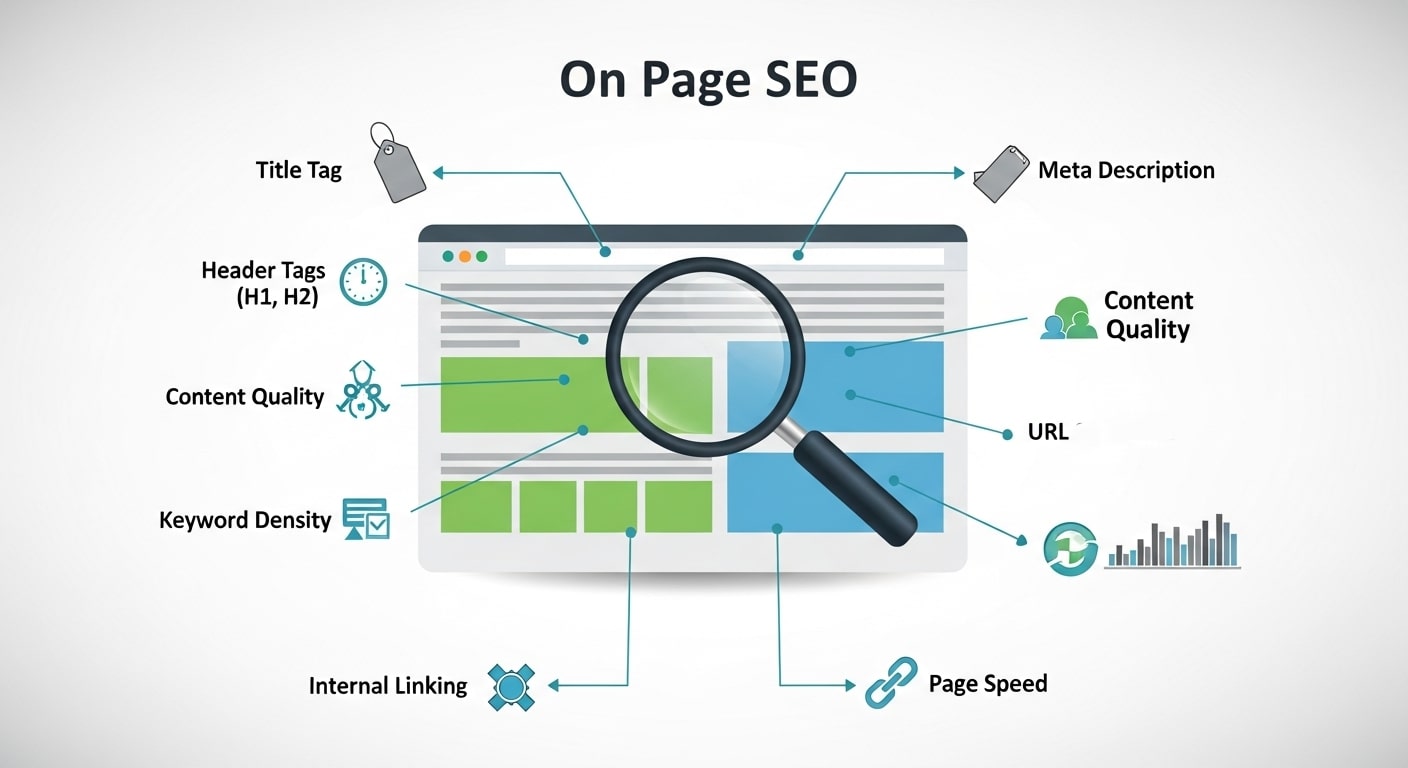
Once the technical side is solid, shift your focus to what visitors actually see. On-page SEO involves optimizing individual pages to rank higher and earn more relevant traffic.
Audit Your Keywords
Are you targeting the right terms? A complete website audit should reveal if your keywords align with user intent.
- The Fix: Ensure your primary keyword appears naturally in the H1 tag, the first 100 words of the content, and the meta description. Avoid “keyword stuffing,” which looks unnatural and can lead to penalties.
Optimize Title Tags and Meta Descriptions
These are your billboards in the search results. If they aren’t compelling, no one clicks.
- The Fix: Keep title tags under 60 characters and meta descriptions under 160 characters. Make them punchy, relevant, and action-oriented. If you are a local business, like us here at SanMo, ensure your location is mentioned where relevant.
Content Quality and Freshness
Search engines love fresh, authoritative content. Outdated blogs or thin service pages can hurt your authority.
- The Fix: Review your top-performing pages. Can the content be updated with new statistics or better images? For low-performing pages, consider rewriting them or merging them with other relevant content. This process, often called “content pruning,” strengthens your overall site quality.
Check Heading Structure
Headings (H1, H2, H3) provide structure for readers and context for search engines.
- The Fix: Ensure every page has one unique H1 tag. Use H2s and H3s to break up text logically. This improves readability scores and helps users skim for information.
Step 4: Assess User Experience (UX) and Design
You can have perfect SEO, but if your website is ugly or hard to use, visitors will leave. UX is about making the journey from “visitor” to “customer” as frictionless as possible.
Mobile Responsiveness
More than half of global web traffic comes from mobile devices. If your site doesn’t adjust seamlessly to different screen sizes, you are alienating a massive audience.
- The Fix: Use Google’s Mobile-Friendly Test tool. If elements are too close together or text is too small to read on a phone, you need to adjust your CSS or switch to a responsive theme.
Navigation and Site Architecture
Can users find what they are looking for in three clicks or less? Complex menus confuse users.
- The Fix: Simplify your menu. Use clear, descriptive labels like “Services,” “About,” and “Contact,” rather than clever or vague terms. Ensure your internal linking structure connects related pages logically.
Accessibility Check
The web should be accessible to everyone, including people with disabilities. Accessibility is also increasingly becoming a legal requirement.
- The Fix: Ensure images have “alt text” for screen readers. Check that your color contrast ratios are sufficient for text readability. Ensure your site can be navigated using only a keyboard.
Step 5: Conversion Rate Optimization (CRO)

The ultimate goal of your website is likely to generate leads or sales. An audit is the perfect time to review your conversion paths.
Call-to-Action (CTA) Clarity
Are your CTAs visible? Do they tell the user exactly what to do?
- The Fix: Use contrasting colors for buttons. Instead of generic text like “Submit,” use action-oriented phrases like “Get My Free Quote” or “Schedule a Call.”
Form Functionality
Long, complicated forms are conversion killers.
- The Fix: Test every form on your site. Do they work? Do they send the confirmation email correctly? Reduce the number of fields to the absolute minimum required. If you only need a name and email, don’t ask for a phone number and address.
Step 6: Off-Page SEO and Backlink Profile
While “off-page” technically happens away from your site, it deeply impacts your domain authority. Your backlink profile is a measure of how many other websites link to yours.
Identify Toxic Backlinks
Not all links are good links. Links from spammy, low-quality sites can harm your reputation with Google.
- The Fix: Use a backlink analysis tool to review your profile. If you find links from suspicious domains, you can use Google’s Disavow Tool to tell search engines to ignore them.
Competitor Gap Analysis
See what your competitors are doing that you aren’t.
- The Fix: Look at the websites ranking above you for your target keywords. Who is linking to them? This can give you ideas for outreach and partnership opportunities to build your own authority.
Prioritizing Your Fixes
Conducting a complete website audit generates a long to-do list. It can be overwhelming. The key is prioritization. You don’t need to fix everything overnight.
Use the “Impact vs. Effort” matrix:
- High Impact, Low Effort: Fix these first. (e.g., Fixing broken links, compressing images, updating meta tags).
- High Impact, High Effort: Schedule these as major projects. (e.g., Site redesign for mobile, migrating to HTTPS).
- Low Impact, Low Effort: Do these when you have spare time.
- Low Impact, High Effort: Ignore these or reconsider if they are necessary.
Tools of the Trade
You don’t have to do this manually. Here are some industry-standard tools to assist with your SanMo service provider website audit:
- Google Analytics & Search Console: The absolute essentials for traffic and health data. (Free)
- Screaming Frog SEO Spider: Excellent for crawling your site to find technical errors. (Free version available)
- PageSpeed Insights: Google’s tool for analyzing load times. (Free)
- SEMrush or Ahrefs: Comprehensive suites for keyword tracking, backlink analysis, and competitor research. (Paid)
Keep Your Digital Door Open
A website is never truly “finished.” It is a living entity that requires care, maintenance, and regular check-ups. The digital landscape changes rapidly—Google updates its algorithms, user preferences shift, and competitors emerge.
By committing to a regular, complete website audit—perhaps once a quarter or biannually—you ensure that your business remains visible, accessible, and competitive. Whether you are troubleshooting a specific issue or looking to scale your traffic, the data you gather from an audit is the roadmap to your success.
If you are feeling overwhelmed by the technical jargon or simply don’t have the time to dig through the data, professional help is available. At SanMo, we specialize in comprehensive digital strategies that take the guesswork out of website maintenance.
Don’t let hidden errors stifle your growth. Take a look under the hood of your website today.
Frequently Asked Questions (FAQ)
1. What is a complete website audit?
A complete website audit is a comprehensive evaluation of your website’s technical health, SEO, user experience (UX), and content quality. It identifies issues that could affect performance, rankings, and conversions, giving you a clear roadmap for improvement.
2. How often should I perform a website audit?
For most businesses, conducting a website audit once every 3–6 months is ideal. This ensures you catch technical issues early, stay aligned with SEO updates, and maintain a strong user experience.
3. Do I need technical skills to perform a website audit?
Basic audits can be done using free tools like Google Analytics, Search Console, and PageSpeed Insights. However, technical issues such as broken links, crawl errors, or site speed optimizations may require professional expertise to fix effectively.
4. What areas does a website audit cover?
A complete audit typically covers technical SEO (crawlability, indexing, site speed), on-page SEO and content (keywords, meta tags, headings), UX and design (mobile responsiveness, navigation, accessibility), and conversion optimization (CTAs, forms, user journeys).
5. Can a website audit improve my search rankings?
Yes. By identifying and fixing issues like broken links, slow pages, poor mobile usability, and weak content, a website audit helps search engines crawl your site more efficiently, improving rankings and increasing organic traffic.
6. Should I do a DIY audit or hire a professional?
Small audits can be done yourself using free tools, but a professional audit is recommended for comprehensive results. Experts can uncover hidden issues, prioritize fixes, and provide actionable strategies to boost traffic, engagement, and conversions.